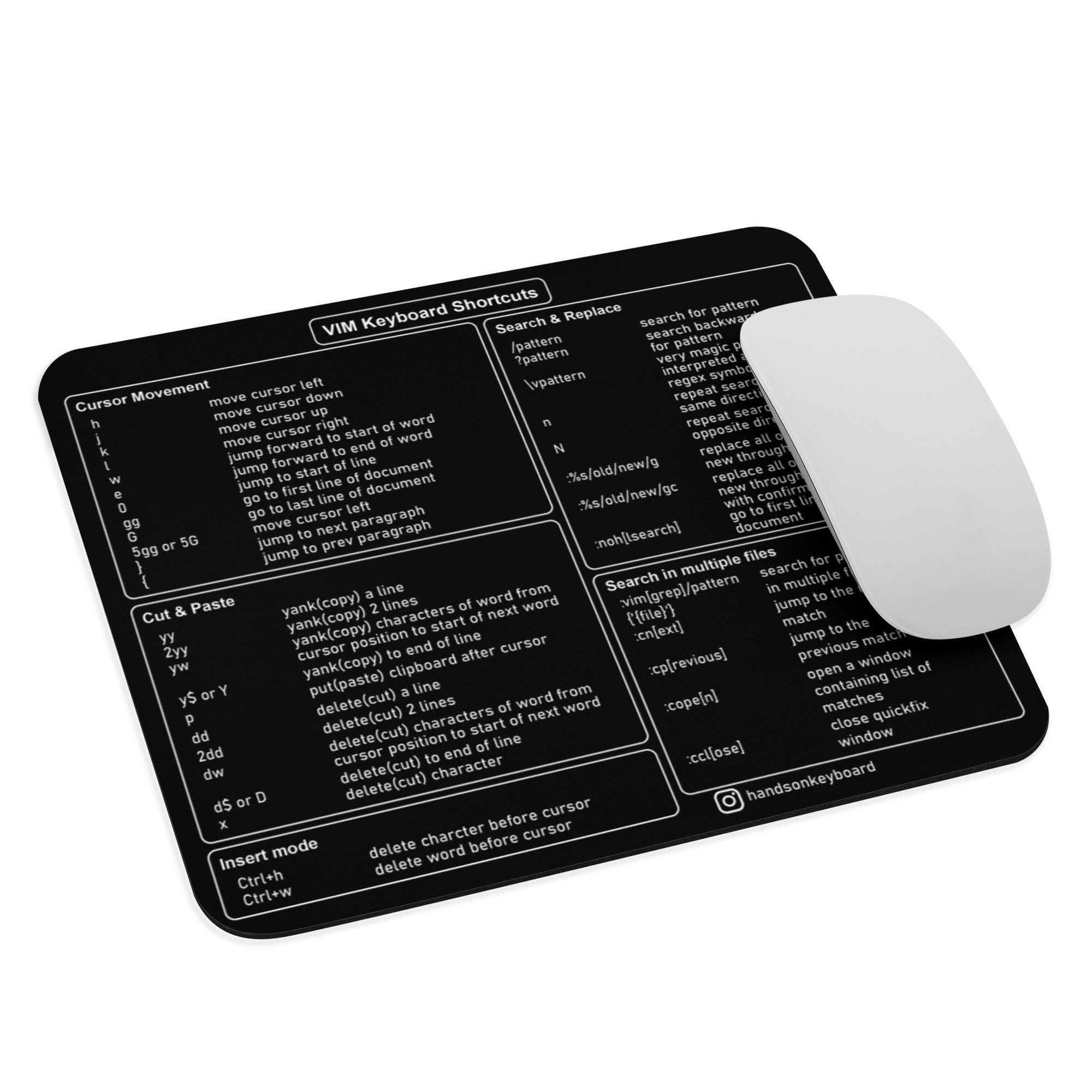

Mastering Vim Keyboard Shortcuts can significantly enhance your productivity and efficiency, especially for developers and power users who spend a lot of time editing text. Vim, a highly configurable text editor, is known for its powerful command-line interface and extensive set of keyboard shortcuts that allow users to perform complex tasks with minimal keystrokes. Whether you are a seasoned Vim user or just starting out, understanding and utilizing Vim Keyboard Shortcuts can transform your workflow.
Understanding Vim Modes
Before diving into Vim Keyboard Shortcuts, it’s essential to understand the different modes in Vim. Vim operates in several modes, each serving a specific purpose:
- Normal Mode: This is the default mode where you can navigate and manipulate text using keyboard shortcuts.
- Insert Mode: This mode allows you to insert text into the document.
- Visual Mode: This mode enables you to select text for various operations like copying, cutting, or formatting.
- Command Mode: This mode is used to execute commands and run external programs.
Basic Vim Keyboard Shortcuts
To get started with Vim, familiarize yourself with the basic Vim Keyboard Shortcuts. These shortcuts are fundamental and will help you navigate and edit text efficiently.
- i: Enter Insert Mode before the cursor.
- a: Enter Insert Mode after the cursor.
- o: Open a new line below the current line and enter Insert Mode.
- O: Open a new line above the current line and enter Insert Mode.
- Esc: Exit Insert Mode and return to Normal Mode.
- h, j, k, l: Move the cursor left, down, up, and right, respectively.
- w: Move the cursor to the beginning of the next word.
- b: Move the cursor to the beginning of the previous word.
- 0: Move the cursor to the beginning of the line.
- $: Move the cursor to the end of the line.
- gg: Move the cursor to the beginning of the file.
- G: Move the cursor to the end of the file.
Advanced Vim Keyboard Shortcuts
Once you are comfortable with the basics, you can explore more advanced Vim Keyboard Shortcuts to further enhance your productivity. These shortcuts allow for more complex text manipulations and navigation.
- dd: Delete the current line.
- yy: Yank (copy) the current line.
- p: Paste the yanked text after the cursor.
- P: Paste the yanked text before the cursor.
- u: Undo the last action.
- Ctrl + r: Redo the last undone action.
- v: Enter Visual Mode to select text character by character.
- V: Enter Visual Mode to select entire lines.
- Ctrl + v: Enter Visual Block Mode to select a rectangular block of text.
- d: Delete the selected text in Visual Mode.
- y: Yank (copy) the selected text in Visual Mode.
- c: Change (delete and enter Insert Mode) the selected text in Visual Mode.
- r: Replace the character under the cursor with the next character you type.
- R: Enter Replace Mode to replace multiple characters.
- :: Enter Command Mode to execute commands.
- /: Search for a pattern in the file.
- n: Move to the next occurrence of the search pattern.
- N: Move to the previous occurrence of the search pattern.
Customizing Vim Keyboard Shortcuts
One of the strengths of Vim is its high degree of customizability. You can create custom Vim Keyboard Shortcuts to suit your specific needs and workflow. This involves editing the .vimrc file, which is Vim’s configuration file.
To customize Vim Keyboard Shortcuts, follow these steps:
- Open your .vimrc file in Vim by running vim ~/.vimrc in your terminal.
- Add custom mappings using the map or noremap commands. For example, to map Ctrl + s to save the file, add the following line:
nnoremap
This command maps Ctrl + s to the :w command, which saves the file.
💡 Note: Using noremap instead of map prevents recursive mappings, which can cause unexpected behavior.
Efficient Text Editing with Vim Keyboard Shortcuts
Vim Keyboard Shortcuts are designed to minimize the need for mouse usage, allowing for faster and more efficient text editing. Here are some tips to help you edit text more efficiently:
- Use w and b to navigate words quickly.
- Use dd to delete lines and yy to yank (copy) lines.
- Use p and P to paste text after or before the cursor.
- Use u to undo and Ctrl + r to redo actions.
- Use v, V, and Ctrl + v to select text in different modes.
- Use r and R to replace characters or enter Replace Mode.
- Use : to enter Command Mode and execute commands like saving, quitting, or searching.
Mastering Vim Keyboard Shortcuts for Enhanced Productivity
Mastering Vim Keyboard Shortcuts can significantly enhance your productivity and efficiency. By understanding and utilizing the various modes and shortcuts, you can perform complex text manipulations with minimal keystrokes. Customizing Vim Keyboard Shortcuts to suit your specific needs can further streamline your workflow and make text editing a more enjoyable experience.
Here are some additional tips to help you master Vim Keyboard Shortcuts:
- Practice regularly to build muscle memory for the shortcuts.
- Explore Vim’s extensive documentation and community resources for more advanced techniques.
- Experiment with custom mappings in your .vimrc file to create a personalized editing environment.
- Use Vim’s built-in help system by typing :help followed by the command or shortcut you want to learn more about.
Vim Keyboard Shortcuts are a powerful tool for anyone who spends a lot of time editing text. By mastering these shortcuts, you can transform your workflow and become a more efficient and productive editor. Whether you are a developer, writer, or power user, Vim's extensive set of keyboard shortcuts offers a wealth of possibilities for enhancing your text editing experience.
Vim Keyboard Shortcuts are a powerful tool for anyone who spends a lot of time editing text. By mastering these shortcuts, you can transform your workflow and become a more efficient and productive editor. Whether you are a developer, writer, or power user, Vim's extensive set of keyboard shortcuts offers a wealth of possibilities for enhancing your text editing experience.
Vim Keyboard Shortcuts are a powerful tool for anyone who spends a lot of time editing text. By mastering these shortcuts, you can transform your workflow and become a more efficient and productive editor. Whether you are a developer, writer, or power user, Vim's extensive set of keyboard shortcuts offers a wealth of possibilities for enhancing your text editing experience.
Vim Keyboard Shortcuts are a powerful tool for anyone who spends a lot of time editing text. By mastering these shortcuts, you can transform your workflow and become a more efficient and productive editor. Whether you are a developer, writer, or power user, Vim's extensive set of keyboard shortcuts offers a wealth of possibilities for enhancing your text editing experience.
Vim Keyboard Shortcuts are a powerful tool for anyone who spends a lot of time editing text. By mastering these shortcuts, you can transform your workflow and become a more efficient and productive editor. Whether you are a developer, writer, or power user, Vim's extensive set of keyboard shortcuts offers a wealth of possibilities for enhancing your text editing experience.
Vim Keyboard Shortcuts are a powerful tool for anyone who spends a lot of time editing text. By mastering these shortcuts, you can transform your workflow and become a more efficient and productive editor. Whether you are a developer, writer, or power user, Vim's extensive set of keyboard shortcuts offers a wealth of possibilities for enhancing your text editing experience.
Vim Keyboard Shortcuts are a powerful tool for anyone who spends a lot of time editing text. By mastering these shortcuts, you can transform your workflow and become a more efficient and productive editor. Whether you are a developer, writer, or power user, Vim's extensive set of keyboard shortcuts offers a wealth of possibilities for enhancing your text editing experience.
Vim Keyboard Shortcuts are a powerful tool for anyone who spends a lot of time editing text. By mastering these shortcuts, you can transform your workflow and become a more efficient and productive editor. Whether you are a developer, writer, or power user, Vim's extensive set of keyboard shortcuts offers a wealth of possibilities for enhancing your text editing experience.
Vim Keyboard Shortcuts are a powerful tool for anyone who spends a lot of time editing text. By mastering these shortcuts, you can transform your workflow and become a more efficient and productive editor. Whether you are a developer, writer, or power user, Vim's extensive set of keyboard shortcuts offers a wealth of possibilities for enhancing your text editing experience.
Vim Keyboard Shortcuts are a powerful tool for anyone who spends a lot of time editing text. By mastering these shortcuts, you can transform your workflow and become a more efficient and productive editor. Whether you are a developer, writer, or power user, Vim's extensive set of keyboard shortcuts offers a wealth of possibilities for enhancing your text editing experience.
Vim Keyboard Shortcuts are a powerful tool for anyone who spends a lot of time editing text. By mastering these shortcuts, you can transform your workflow and become a more efficient and productive editor. Whether you are a developer, writer, or power user, Vim's extensive set of keyboard shortcuts offers a wealth of possibilities for enhancing your text editing experience.
Vim Keyboard Shortcuts are a powerful tool for anyone who spends a lot of time editing text. By mastering these shortcuts, you can transform your workflow and become a more efficient and productive editor. Whether you are a developer, writer, or power user, Vim's extensive set of keyboard shortcuts offers a wealth of possibilities for enhancing your text editing experience.
Vim Keyboard Shortcuts are a powerful tool for anyone who spends a lot of time editing text. By mastering these shortcuts, you can transform your workflow and become a more efficient and productive editor. Whether you are a developer, writer, or power user, Vim's extensive set of keyboard shortcuts offers a wealth of possibilities for enhancing your text editing experience.
Vim Keyboard Shortcuts are a powerful tool for anyone who spends a lot of time editing text. By mastering these shortcuts, you can transform your workflow and become a more efficient and productive editor. Whether you are a developer, writer, or power user, Vim's extensive set of keyboard shortcuts offers a wealth of possibilities for enhancing your text editing experience.
Vim Keyboard Shortcuts are a powerful tool for anyone who spends a lot of time editing text. By mastering these shortcuts, you can transform your workflow and become a more efficient and productive editor. Whether you are a developer, writer, or power user, Vim's extensive set of keyboard shortcuts offers a wealth of possibilities for enhancing your text editing experience.
Vim Keyboard Shortcuts are a powerful tool for anyone who spends a lot of time editing text. By mastering these shortcuts, you can transform your workflow and become a more efficient and productive editor. Whether you are a developer, writer, or power user, Vim's extensive set of keyboard shortcuts offers a wealth of possibilities for enhancing your text editing experience.
Vim Keyboard Shortcuts are a powerful tool for anyone who spends a lot of time editing text. By mastering these shortcuts, you can transform your workflow and become a more efficient and productive editor. Whether you are a developer, writer, or power user, Vim's extensive set of keyboard shortcuts offers a wealth of possibilities for enhancing your text editing experience.
Vim Keyboard Shortcuts are a powerful tool for anyone who spends a lot of time editing text. By mastering these shortcuts, you can transform your workflow and become a more efficient and productive editor. Whether you are a developer, writer, or power user, Vim's extensive set of keyboard shortcuts offers a wealth of possibilities for enhancing your text editing experience.
Vim Keyboard Shortcuts are a powerful tool for anyone who spends a lot of time editing text. By mastering these shortcuts, you can transform your workflow and become a more efficient and productive editor. Whether you are a developer, writer, or power user, Vim's extensive set of keyboard shortcuts offers a wealth of possibilities for enhancing your text editing experience.
Vim Keyboard Shortcuts are a powerful tool for anyone who spends a lot of time editing text. By mastering these shortcuts, you can transform your workflow and become a more efficient and productive editor. Whether you are a developer, writer, or power user, Vim's extensive set of keyboard shortcuts offers a wealth of possibilities for enhancing your text editing experience.
Vim Keyboard Shortcuts are a powerful tool for anyone who spends a lot of time editing text. By mastering these shortcuts, you can transform your workflow and become a more efficient and productive editor. Whether you are a developer, writer, or power user, Vim's extensive set of keyboard shortcuts offers a wealth of possibilities for enhancing your text editing experience.
Vim Keyboard Shortcuts are a powerful tool for anyone who spends a lot of time editing text. By mastering these shortcuts, you can transform your workflow and become a more efficient and productive editor. Whether you are a developer, writer, or power user, Vim's extensive set of keyboard shortcuts offers a wealth of possibilities for enhancing your text editing experience.
Vim Keyboard Shortcuts are a powerful tool for anyone who spends a lot of time editing text. By mastering these shortcuts, you can transform your workflow and become a more efficient and productive editor. Whether you are a developer, writer, or power user, Vim's extensive set of keyboard shortcuts offers a wealth of possibilities for enhancing your text editing experience.
Vim Keyboard Shortcuts are a powerful tool for anyone who spends a lot of time editing text. By mastering these shortcuts, you can transform your workflow and become a more efficient and productive editor. Whether you are a developer, writer, or power user, Vim's extensive set of keyboard shortcuts offers a wealth of possibilities for enhancing your text editing experience.
Vim Keyboard Shortcuts are a powerful tool for anyone who spends a lot of time editing text. By mastering these shortcuts, you can transform your workflow and become a more efficient and productive editor. Whether you are a developer, writer, or power user, Vim's extensive set of keyboard shortcuts offers a wealth of possibilities for enhancing your text editing experience.
Vim Keyboard Shortcuts are a powerful tool for anyone who spends a lot of time editing text. By mastering these shortcuts, you can transform your workflow and become a more efficient and productive editor. Whether you are a developer, writer, or power user, Vim's extensive set of keyboard shortcuts offers a wealth of possibilities for enhancing your text editing experience.
Vim Keyboard Shortcuts are a powerful tool for anyone who spends a lot of time editing text. By mastering these shortcuts, you can transform your workflow and become a more efficient and productive editor. Whether you are a developer, writer, or power user, Vim's extensive set of keyboard shortcuts offers a wealth of possibilities for enhancing your text editing experience.
Vim Keyboard Shortcuts are a powerful tool for anyone who spends a lot of time editing text. By mastering these shortcuts, you can transform your workflow and become a more efficient and productive editor. Whether you are a developer, writer, or power user, Vim's extensive set of keyboard shortcuts offers a wealth of possibilities for enhancing your text editing experience.
Vim Keyboard Shortcuts are a powerful tool for anyone who spends a lot of time editing text. By mastering these shortcuts, you can transform your workflow and become a more efficient and productive editor. Whether you are a developer, writer, or power user, Vim's extensive set of keyboard shortcuts offers a wealth of possibilities for enhancing your text editing experience.
Vim Keyboard Shortcuts are a powerful tool for anyone who spends a lot of time editing text. By mastering these shortcuts, you can transform your workflow and become a more efficient and productive editor. Whether you are a developer, writer, or power user, Vim's extensive set of keyboard shortcuts offers a wealth of possibilities for enhancing your text editing experience.
Vim Keyboard Shortcuts are a powerful tool for anyone who spends a lot of time editing text. By mastering these shortcuts, you can transform your workflow and become a more efficient and productive editor. Whether you are a developer, writer, or power user, Vim's extensive set of keyboard shortcuts offers a wealth of possibilities for enhancing your text editing experience.
Vim Keyboard Shortcuts are a powerful tool for anyone who spends a lot of time editing text. By mastering these shortcuts, you can transform your workflow and become a more efficient and productive editor. Whether you are a developer, writer, or power user, Vim's extensive set of keyboard shortcuts offers a wealth of possibilities for enhancing your text editing experience.
Vim Keyboard Shortcuts are a powerful tool for anyone who spends a lot of time editing text. By mastering these shortcuts, you can transform your workflow and become a more efficient and productive editor. Whether you are a developer, writer, or power user, Vim's extensive set of keyboard shortcuts offers a wealth of possibilities for enhancing your text editing experience.
Vim Keyboard Short
Related Terms:
- vim shortcut end of line
- vim shortcuts cheat sheet
- vim navigation cheat sheet
- vim cheat sheet pdf
- list of vim commands
- vim keys cheat sheet